You’re at work, on a public computer, or just don’t want to install another 2GB game just to lay down a few roads and zone some districts. City building games are deeply satisfying—but too often locked behind downloads, high system requirements, or paywalls. The good news? A growing number of polished, strategic city builders now run directly in your browser. No installation. No setup. Just click and build.
These games capture the essence of urban planning—zoning, infrastructure, budgeting, and growth—without demanding disk space or technical know-how. Whether you're killing time between meetings or testing design theories, browser-based city builders deliver real depth. Here’s where to play them, what to expect, and how to get the most from each experience.
Why Play City Building Games Online Without Download?
The appeal of no-download city builders goes beyond convenience. They solve real friction points:
- No storage commitment: Ideal for laptops with limited space or shared devices.
- Cross-device access: Start on your work laptop, continue on a tablet at home.
- Zero installation risk: Avoid adware, background processes, or corrupted installers.
- Fast testing ground: Try different mechanics before investing in premium titles like Cities: Skylines.
But not all browser city builders are equal. Some resemble mobile ports with aggressive monetization. Others offer surprisingly deep simulation. The key is identifying which blend gameplay depth with browser-friendly design.
What Makes a Great Browser-Based City Builder?
A top-tier online city game doesn’t just run in a browser—it thrives there. Look for these traits:
- Intuitive controls: Drag-and-drop zoning, responsive UI, mobile compatibility.
- Strategic depth: Taxes, traffic, pollution, and citizen happiness matter.
- Progression systems: Unlock new buildings, tech tiers, or policy options.
- Visual feedback: Watch your city grow with animations, population counters, and day-night cycles.
- Offline resilience: Some save to cloud or local storage, letting you return mid-session.
Avoid games that rely on constant pop-ups, forced video ads every 60 seconds, or "pay-to-build" mechanics. True city building is about thoughtful planning, not grinding for coins.
Top 5 City Building Games Online No Download
Below are five standout titles you can play instantly—no registration required in most cases. Each offers a different flavor of urban development, from minimalist sandbox to policy-driven simulation.
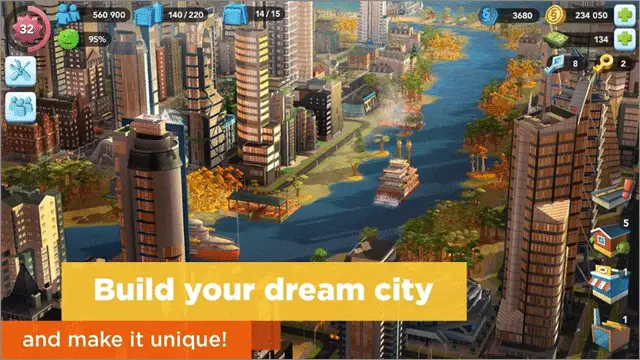
1. SimCity BuildIt (Browser Version) Developer: Electronic Arts Platform: Facebook Gameroom, GameTitan, and select web portals
Yes—EA’s mobile hit has a browser iteration. While not as robust as the original SimCity, this version delivers polished graphics and core mechanics: residential, commercial, and industrial zones, plus a supply chain mini-game through factories and docks.
Pros - Familiar UI from the mobile version - Real-time multiplayer trading with global players - Regular events and themed content

Cons - Heavy monetization (speed-ups, premium currency) - Build queues can stall progress without paying
Tip: Use the browser version to avoid app store fees. Look for free “Starter Pack” bonuses—some portals offer 30% more simoleons on first login.
2. Urban Concerto Developer: CrazyGames Platform: CrazyGames.com
A lightweight but surprisingly deep city builder with realistic traffic AI and pollution modeling. You start with a blank plot, a budget, and basic services. Expand roads, set tax rates, and balance happiness against growth.
Pros - Clean, modern UI with responsive controls - Realistic traffic simulation affects business efficiency - Educational value: demonstrates urban planning trade-offs
Cons - Limited building variety compared to premium titles - No export or save-sharing features
Use Case: Great for teaching basic city planning principles. Try building a car-free downtown and watch how transit demand spikes.
3. Bit City Developer: Supersolid Platform: Poki.com, CrazyGames, and HTML5 game portals
Don’t let the pixel art fool you—Bit City hides depth beneath its retro surface. It’s an idle/clicker hybrid where your city grows vertically and horizontally as you tap to expand zones.
Pros - Addictive progression loop - Unlock skyscrapers, parks, and landmarks - Works on low-end devices
Cons - More idle than strategic - Late-game grind without meaningful decisions
Workflow Tip: Play in 10-minute bursts. Use auto-builders once you reach 100k population to minimize micromanagement.
4. The Simulation: City Builder Developer: Vexel Games Platform: GameDistribution, Poki
One of the few browser games with district specializations and policy toggles. You can designate areas as eco-friendly, high-density, or industrial hubs—with consequences. Pollution reduces health, while green spaces boost tourism.
Pros - Policy sliders for taxation, education, and healthcare - District types affect building unlocks - Day-night cycle impacts energy use
Cons - Occasional lag with large cities - Ads between sessions (non-intrusive)
Realistic Scenario: Try going fully renewable—shut down coal plants, build wind farms, and watch your budget bleed until solar tech upgrades unlock.
5. Idle Tower Builder Developer: GGJAM Platform: itch.io, direct HTML5 links
Not a traditional city builder, but a compelling twist: you manage vertical urban growth. Build floors, assign tenants, generate income, and unlock new tower types.
Pros - Fresh take on urban development - Offline income system - Minimalist design, zero bloat
Cons - Lacks city-wide infrastructure layers - More business sim than city planner
Best For: Fans of incremental games who want city-building aesthetics without complex logistics.
How to Choose the Right Game for Your Play Style
Not all city building experiences are equal—and your goals should guide your pick.

| If You Want… | Try This Game | Why |
|---|---|---|
| Real strategy and traffic AI | Urban Concerto | Simulates real-world flow and service delivery |
| Fast, casual play | Bit City | Tap-to-expand mechanic works in short sessions |
| Multiplayer interaction | SimCity BuildIt | Trade goods and visit other players’ cities |
| Policy depth | The Simulation: City Builder | Tax, education, and healthcare sliders add realism |
| Vertical innovation | Idle Tower Builder | Unique focus on high-rise economics |
Avoid defaulting to the most popular title. SimCity BuildIt dominates searches, but if you dislike microtransactions, it’ll frustrate you by level 10.
Common Mistakes New Players Make
Even experienced gamers stumble when jumping into browser city builders. Avoid these pitfalls:
❌ Zoning Too Much Too Soon Loading up on residential zones before building power, water, or roads leads to instant collapse. Rule of thumb: For every 3 zones, have 1 utility building.
❌ Ignoring Traffic Flow In games like Urban Concerto, clogged roads reduce fire response times and hurt commerce. Place intersections strategically and avoid gridlock corridors.
❌ Overlooking Budget Levers
Many players forget they can adjust taxes. In downturns, lower residential taxes to prevent abandonment. Raise commercial taxes during booms—just don’t spike them.
❌ Skipping Tutorials Browser games assume minimal prior knowledge. Take the first 5 minutes to learn UI hotkeys—most support keyboard shortcuts for road, zone, and delete tools.
Hidden Features Most Players Miss
The best browser city builders include subtle systems that reward exploration:
- Disaster events: In The Simulation, random floods can destroy districts—unless you invest in drainage.
- Tourism mechanics: Landmarks like parks or museums attract visitors, boosting income.
- Citizen feedback: Hover over houses to see happiness levels. Low happiness? Check pollution or unemployment.
- Export tools: Some games let you share city screenshots or save files via URL.
Try this experiment: Build a city with no industry. Rely solely on tourism and services. Can you stay profitable? It’s harder than it looks—and reveals how real economies depend on balance.
The Future of No-Download City Builders
Browser tech is evolving fast. With WebAssembly and HTML5 advancements, we’re seeing desktop-grade simulations run in tabs. Expect:
- Cloud saves across devices
- Mod support via browser extensions
- AI advisors that suggest traffic fixes or budget tweaks
- Cross-game city imports (e.g., export your Urban Concerto map to a mobile sequel)
Developers are also leaning into sustainability themes—solar incentives, carbon taxes, and green zoning. These aren’t just gameplay mechanics; they mirror real urban policy debates.
Start Building—No Download Needed
You don’t need a gaming rig or a credit card to experience the thrill of city planning. The best city building games online no download required are accessible, intelligent, and surprisingly deep. Whether you want a five-minute distraction or a long-term project, there’s a browser game that fits.
Pick one from the list—Urban Concerto for realism, Bit City for casual fun, or The Simulation for policy depth—and open it in a new tab. Lay your first road. Zone your first district. Watch your population climb.
The city is yours. And you didn’t even have to install a thing.